It's been a while since last KDU update and thanks to Artem Baranov from Kaspersky my attention is again on it. The new 1.2 release contain eight new providers and set of additional changes that were required for new providers work. Here is list of new providers added, the details on each are following:
- GMER "antirootkit"
- Dell BIOS Utility (assigned CVE-2021-21551)
- Mimikatz "Mimidrv"
- Process Hacker "KProcessHacker2"
- Process Explorer "ProcExp152"
- Dell BIOS Utility (assigned CVE-2021-36276)
- Cheat Engine
- ASUS GPU Tweak II/III (EneTech next-gen)
And after describing new providers we will take a tour into wonderful world of Microsoft incoherency with their newest Win10/Win11 drivers blacklist managed by CI.dll
Providers description
(number is ID in KDU database)15. GMER "antirootkit"
 |
| Pic 1. What could possible go wrong here |
GMER "antirootkit", I'm familiar with this software since it birth and introduction by author (Przemyslaw Gmerek) on SysInternals forums during Rustock's first variants most active period. Since it first release it was a mediocre software with limited capabilities to detect or remove anything despite author claims (he still has a dedicated gallery on his long forgotten site). Since I was developing the same toolset during that time I of course reverse-engineered GMER to find out if there is anything interesting in it. It sounds fun but this is exactly how things were going in the 2005-2010 anywhere with tools developed by enthusiasts. Amount of copy-pasted techniques and code from different authors in different tools of this time is tremendous. GMER driver doesn't surprised me and except obvious bugs I didn't found anything else interesting in it, except number of simple ways how to completely make it blind in case of rootkit detection (we later implemented one of in our laboratory rootkit called Unreal so Gmerek was forced to do an emergency update 😅). Remember, it was year 2006 and Windows XP was all around and shiny again after general Vista fuckup. Entire class of this software died around 2011-2013 so I was surprised that GMER actually managed not only survive but move to x64 world. Ohh, better he doesn't. The actual x64 driver made of copy-paste from x86 version with few things adjusted to make it work on x64 and some features that are bound to x86 only completely removed. For some unknown reason it still has a branches of code that doesn't make any sense on x64, that shows how actually author didn't care about final product. Since acquiring by Avast their Avast MBR tool contain exact the same driver from GMER (because it's powered by "GMER technology", this is a fucking rofl yeah). From current perspective this driver is a wormhole and I'm surprised no one actually tried to exploit it for a fancy CVE id, almost just like Trend Micro tool highlighted in one of my previous posts. For KDU usage the most prominent features of GMER are arbitrary kernel virtual memory read and write. This is not a bug, it is intentionally created mess so GMER can read/write kernel memory via it's process. This feature implemented via MDL mapping and accessible with dedicated IOCTL with simple data structure. One important note is that before calling this (or any other IOCTL) you have to talk with GMER driver first to let it know it was "initialized". This is done with a special IOCTL. Note that GMER driver sets exclusive flag when creating it device object, however when application crash driver stays in memory and accessible for everyone.
TL;DR - current GMER is completely useless (and dangerous due to multiple bugs, just look on pic 1 - few seconds before BSOD) in terms of "rootkit detection" usage and represent a security risk by containing Windows security bypasses available without any proper verification of caller nor access checks.
16. Dell BIOS Utility (assigned CVE-2021-21551)
This one is pretty simple and well described in CVE entry. This is a typical flaw in giveio-type drivers. It has memmove with completely user controlled parameters send by special IOCTL. Such "features" aren't so rare in the wonderful world of hardware vendors drivers.
17. Mimikatz "Mimidrv"
This is auxiliary driver from Mimikatz tool which is open-source. Mimikatz is a well known tool and a lot of people found it damn useful. Well I'm not one of them. Speaking of mimidrv - it has full source available and by opening this source you will want to close it ASAP to not hurt your eyes with amount of shitcode you will face. It's a complete bugged wormhole which has number of built binaries with different versions all signed with a valid certificate. No wonder Microsoft banned this certificate in their HVCI blocklist which we will discuss later. We are interested here in arbitrary kernel virtual memory read/write IOCTL's, in fact they are almost the same as in GMER. You don't need any special preconditions to start using mimidrv. Here is the details on other features of mimidrv - Mimidrv In Depth: Exploring Mimikatz’s Kernel Driver if you are interested.
18. Process Hacker "KProcessHacker2"
It is famous tool and I remember how it was born. Process Hacker come at SysInternals forum with wj32 in the late 00s in form of open source task manager replacement written in C#. It was immediately criticized for this by forum members and after some reconsiderations wj32 ported it on more suitable programming language (thankfully there wasn't any cancer like Rust popular that days). PH roots from Windows XP era with same design and philosophy. That's how it started and worked just fine until Turla malware group widely popularized BYOVD (Bring Your Own Vulnerable Driver) attacks in 2014-2015. The mentioned PH driver KProcessHacker2 was abused by multiple actors starting from malware and ending up with cheat community. This followed with wave of antivirus detections and game bans. All because of this tool initial design and philosophy from Windows XP era. That is why it was full of wormhole functionality and still have it up-to-date. What is so unique in this driver? It provides a set of IOCTL's which work as Windows API replacements for several key to the Windows security functions. Just a few of them for example: OpenProcess, OpenThread, DuplicateHandle, TerminateThread, TerminateProcess, Set/GetThreadContext, Read/WriteProcessMemory. Natural hackbox isn't it? Earlier versions of PH code (which all nicely written and well documented) even contain remarks where author hopes that this driver client "is not a virus" so wj32 clearly predicted things can go worse 😏 We will go back to PH in the end of this post. For KDU tasks this driver maybe not looking good at first glance (it looks like more suitable for malware usage 😂), but then if you look on the things from a different perspective - hell yeah. Here is why - starting from ancient Windows NT versions up to latest Windows 10 release "System" process keeps handle to physical memory section. It was abused before for physical memory access and later Microsoft banned it from user mode usage by setting object header flag -> kernel only access so you can't open new handle for this section from the user mode. Later MS added protected processes feature which additionally blocked exploitation because you can't open "System" process with sufficient rights. And here Process Hacker driver comes to the rescue with it hackbox IOCTL's allowing us: open full process handle for "System" process, duplicate physical memory section handle to our process with same full access rights. Further is trivial. Important note about fancy new Windows 10 rebrand called Windows 11. There is no physical memory section handle in "System" process as I observed and it is too boring to figure out is it intentional or need any preconditions to make it popup again - you may consider this as homework.
19. Process Explorer "ProcExp152"
Rival of previous task manager. Or previous task manager is a rival to this, or new Windows 10/11 taskmanager is a rival to both or vice versa or..., I don't really follow this "task manager market war" which is a complete bullshit, just the fact that Process Explorer existed long before PH release and PH "release to public" place was Process Explorer developers forums. This is a small handy tool developed by Mark Russinovich before his acquiring by Microsoft and abandoning all his tools (they are now out-sourced to some Microsoft geniuses who decided to remake classic UI with new over overstretched buttons and idiotic bitmaps ruining your old UI experience, and oh-ah "dark mode" I forgot about it). Process Explorer driver provide limited set of features that works almost the same as hackbox from PH. Have you heard about AV detecting Process Explorer as malware? I didn't, maybe because it is signed by Microsoft?😄 Anyway, this driver does have access checks implemented at dispatch routine so it fits into Microsoft wonderland of what they call "security boundaries". It doesn't really matter for BYOVD, this driver allows process opening, handle duplication, process termination and more. It is used in KDU in a similar manner as KProcessHacker2 driver. Oh, it even re-used next by KDU as placeholder for the final shellcode, what an irony.
20. Dell BIOS Utility (assigned CVE-2021-36276)
The same as previous Dell driver except it has different steps required for loading and new device name. In fact this is example of "fix" similar to that I described in my previous blogpost. TL;DR Dell fixed nothing and posed this driver update as ultimate fix for previously reported vulnerabilities. KDU exploits 2.5 version driver as I didn't bothered to find 2.7, but from all the description etc it will work the same way on 2.7 you only need to change device name.
21. Cheat Engine
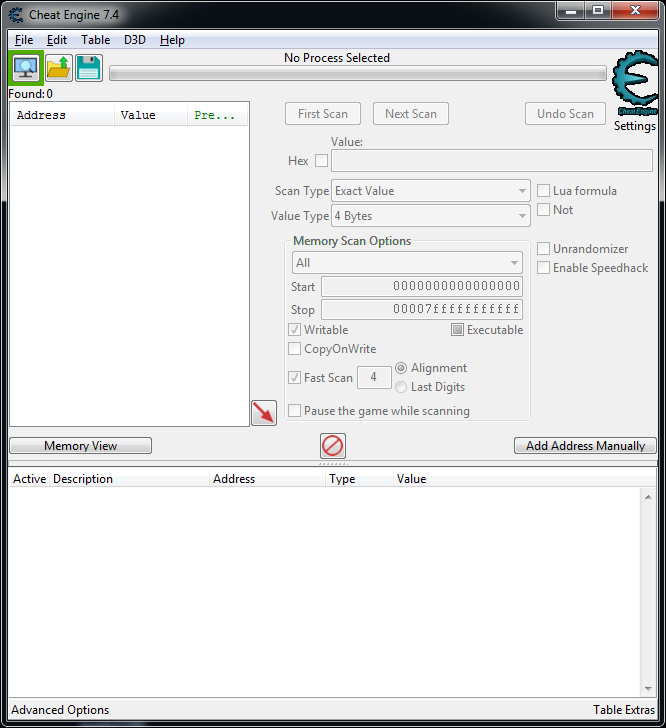 |
| Pic 2. Cheat Engine 7.4 |
 |
| Pic 3. Cheat Engine DBK load failure, Windows 7 |
22. ASUS GPU Tweak II/III (EneTech next-gen)
It is implementation of what is stated in my previous blogpost. Nothing changed since that time, ASUS continuously use this trash in a number of it software products up to date. Side note, they also introduced new driver which looks like heavy remake of original WinIO with most of it dangerous features stripped, however not all. It is a something to investigate later.
HVCI blocklist or welcome to wonderful world of Microsoft incoherency
This feature introduced with HVCI on Windows 10. It is implemented as blocklist stored in \systemroot\system32\codeintegrity\driversipolicy.p7b file as certificate blob and specific code at CI.DLL to manage it. Decoding this "driverspolicy" data maybe accomplished with the following PowerShell script -> https://gist.github.com/mattifestation/92e545bf1ee5b68eeb71d254cec2f78e. Microsoft maintains current state of this list on github -> https://github.com/MicrosoftDocs/windows-itpro-docs/blob/public/windows/security/threat-protection/windows-defender-application-control/microsoft-recommended-driver-block-rules.md. This blocklist is loaded and parsed by CI.DLL in kernel mode and invoked when HVCI is enabled (Core Isolation -> Memory Integrity) and something is trying to load driver. If this driver (authenticode hash, page hash, filename from version block, filename and version range from version block) found in blocklist Windows will deny it loading and log event. Presumable this list will be updated and each new Windows 1X "release" will bring brand new blocklist. Or they even managed to do it auto updating didn't checked that, at least previous Windows 10 versions doesn't seems update it since install.
Lets take Process Hacker discussed above, but latest version, and try to load it as admin with HVCI enforced:
 |
| Pic 4. HVCI enforced block of kprocesshacker.sys |
With event 5038 added to the system security event log:
Code integrity determined that the image hash of a file is not valid. The file could be corrupt due to unauthorized modification or the invalid hash could indicate a potential disk device error.
File Name: \Device\HarddiskVolume3\ProcessHacker\kprocesshacker.sys
and NTSTATUS codes like STATUS_IMAGE_CERT_REVOKED and STATUS_DRIVER_UNABLE_TO_LOAD. This is actual Process Hacker v3.0 with valid digital signature and KProcessHacker3 which is immune to previous abuse by malware and cheaters.
Why is this happening or welcome to wonderful world of Microsoft incoherency.
Microsoft added Process Hacker (PH) to HVCI blocklist just recently. There are no live examples of Process Hacker v3 abuse by malware except one from Crowdstrike dated back to 2019 and updated in the Dec 2021, https://www.crowdstrike.com/blog/how-doppelpaymer-hunts-and-kills-windows-processes/. This post gives you a brief to supposedly PH driver malicious usage involving full bypass of it integrated client verification introduced in 2.39 and still used in 3.0+. From that post you will learn that over-engineered approach which is used almost everywhere in PH code doesn't guarantee security and wormhole features are still can be used by 3rd party if they really want to. From my point of view malware authors has nothing else to do by choosing Process Hacker driver as their "provider" because:
- There are exist alternatives with much simpler (or none at all) verification logic, using them you can achieve the same "terminator" features;
- Process Hacker already signatured by various
FakeAV as PUP/Tool/HackTool (or TrojanMulDrop lol) because it different old versions are used by malware and they share scan patterns.
Or they just wanted to piss-off PH authors showing them bypass of it over-engineered verification. Why then Microsoft doesn't considers its own Process Explorer (PE) driver as malicious security breaking tool? Lets leave aside "because it Microsoft signed lol" or "because it fits into security boundaries, have you saw secure device and SePrivilegeCheck?". If you compare how exactly PH and PE drivers does their "process" management you will notice that PH actually does it on lower level than PE. There are other functionally which is also should not exist at all - like duplicating handles, write/reading arbitrary processes memory, changing thread contexts etc. But lets start with simple thing, how PH and PE both acquire process handles.
PH uses PsLookupProcessThreadByCid/PsLookupProcessByProcessId and ObOpenObjectByPointer. This allows it to skip ordinary access checks, ETW logging and... bypass some of the security products relying on filtering. It is basically reimplemented ntoskrnl ZwOpenProces->PsOpenProcess function with all the Se validation replaced with PH client/call verification. In comparison PE simple calls ZwOpenProcess with GENERIC_ALL desired access value. Both approaches are terrible piece of shit and comes from Windows XP era. If you need a handle to process/thread etc - use usermode call, that's is the only solid way to guarantee security and audit. If you still insist on accessing protected processes then entire operation should only take place in kernel after Windows security verification without returning anything important to usermode. Any termination/memory read/write from driver should be banned at all. This will however turn off "hacking" features of products as they won't be able to open/read/write everything. Sorry guys but this is how Windows now designed - if you not a part of trusted system code you can't access what ever you want. And there we have a dilemma - two drivers with wormhole functionality ideal for BYOVD attacks. One maintained open-source project, second proprietary Microsoft code without updates for decades. Both used by malware including APT. One in HVCI blocklist, second nope. I call this bullshit, Microsoft. What about PH, guys you are fucking process manager with extended features, not a Windows subsystem to replace or reinvent the MS security wheel just because you have nothing else to do and want to practice with system programming. Your "multi-purposing" is actually playing against you and serves no other purpose. You already removed a lot of "hacking" code from Process "Hacker" and still have a lot to remove/rework. Leave all this "hacking" to where it started - in the Windows XP era.
Another piece in this blocklist that attracted my attention is a number of strange drivers MS added seems by lurking on unknowncheats.me forum, including leaked certificates. Well it is good to know you lurk on most currently famous forum dedicated to kernel mode rootkits (what an irony yeah).
VBoxDrv innotek entry brings good old memories of Turla and later DSEFix/TDL. The only question here is why innotek only. Unlike popular opinion the exploit used by Turla group wasn't previously disclosed and therefore fixed in next versions, so basically it was a zeroday. This entire confuse makes you think that VirtualBox has only innotek signed Turla-style exploitable drivers. Meanwhile I would remember you that Sun acquired innotek GmbH in 2008 and later VirtualBox versions came out signed by Sun certificate. Since this vulnerability in vboxdrv wasn't fixed - all vboxdrv drivers at least up to 3.0 version are equally vulnerable and can be easily adopted to be used like in DSEFix or TDL 😉 (which was already done by some Chinese APT few years ago). Strange that this is not noticed by Microsoft.
 |
| Pic 5. The old the new thing |
Ideally this blocklist should be twice or triple size bigger with only what is available on public today. No iobit, zemana fakeav drivers, no mihoyo, other anticheat crapware, no nVidia trash, no endless MSI packs of crap. Are you kidding, Microsoft? This is all available and exploitable. Right here, right now. Stop being a slowpoke, I've cookie for you.


