Showing posts with label releasenotes. Show all posts

Tuesday, February 4, 2020

VBoxHardenedLoader v2

Pic 1. VBoxHardenedLoader VM historical splash screen from 2014.

This is a major update of VBoxHardenedLoader which initial purpose is to hide VirtualBox from detection by various skid malware available up to date.

Key changes:

1. Support of new VirtualBox 6.1.x version

The VBox 6.1 version brings huge number of changes under the hood and none of previous loaders will work with it correctly. This includes updates ACPI tables, BIOS rom files and EFI ROM module.

2. New monitoring driver and new way of it loading.

VBoxHardenedLoader historically uses Tsugumi.sys to patch VBoxDD.dll library in run-time, when VBox process is loading them. This dll contain a lot of detection traces that next can be used to detect virtual machine from the inside. Because of idiotic feature created by Oracle and called "hardening" there is no other ways to do that on Windows except patch this dll during run-time and do this only from kernel mode as Oracle "hardening" actively opposes any attempt to do changes from user mode.

Since version 2 there is no more TDL involved as driver loader and as fact there is no more Tsugumi driver. TDL is known to have issues with newest Windows 10 versions as well as PatchGuard is really unhappy with drivers it map. Instead of TDL VBoxHardenedLoader is now include KDU (Kernel Driver Utility) codebase to install and start in kernel mode monitoring code. The entire KDU project as in fact was developed just to replace TDL for VBoxHardenedLoader. This new monitoring code is a shellcode version of initial Tsugumi driver specially reimplemented for KDU usage and PatchGuard checks. You can read how KDU work from it readme section of github https://github.com/hfiref0x/KDU#how-it-work. However this is *lite* version of what is used in VBoxHardenedLoader. Extended version does a lot more - it control Process Explorer victim driver unload routine (fully reimplements it) and uses victim driver data section to store it own data. In fact there is nothing much left from original Process Explorer driver after Tsugumi takes control.

This also highlights obvious limitation - when you are using VBoxHardenedLoader you can't use Process Explorer from SysInternals at full it capabilities. Well, it will work, but it driver won't accept any commands from Process Explorer application. If Process Explorer attempt to unload it driver this will just result in Tsugumi monitoring stop. Driver will be unloaded and next time when starting VM with settings from VBoxHardenedLoader you will have to restart loader again, otherwise VM won't start. So if you want a free and much more powerful alternative - just use Process Hacker instead. Honestly, Process Explorer is useless and seems exist just to serve as a placeholder for shellcodes.

3. Reimplemented installation guide to reflect main changes.

The above changes resulted in installation guide remake, everything related to TDL was removed. Some guide sections simplified, screenshots and settings refreshed for VBox v6.1.2.

Take a note that some detection vectors are still working because they based on things Oracle does not want (or able) to fix for years.

Project link
https://github.com/hfiref0x/VBoxHardenedLoader

P.S.
It would be much easier if in some day some smart guy from Oracle management will force out "hardening" idiocy or at least make it optional or/and configurable.

Thursday, January 16, 2020

WinObjEx64 v1.8.3 release

This is maintenance release. It contain only internal program changes, small bugfixes (e.g. current directory affects plugins availability in case if program restarted elevated/or as system) and little usability improvements (rescan option for system call tables dialog). No new features have been added. Unfortunately I wasn't able to test latest 20H2 builds as they apprears to be unstable and I'm having issues with their install.

Link to download
https://github.com/hfiref0x/WinObjEx64/releases/tag/v1.8.3

Thursday, November 28, 2019

WinObjEx64 v1.8.2 release

Here is summary of changes from previous WinObjEx64 version. It is much detailed than any change log or help section. In future I plan to post such entry for each next WinObjEx64 release, it also should help tracking not only changes but possible regressions or bugs.

Lets start with current 1.8.2 release. 

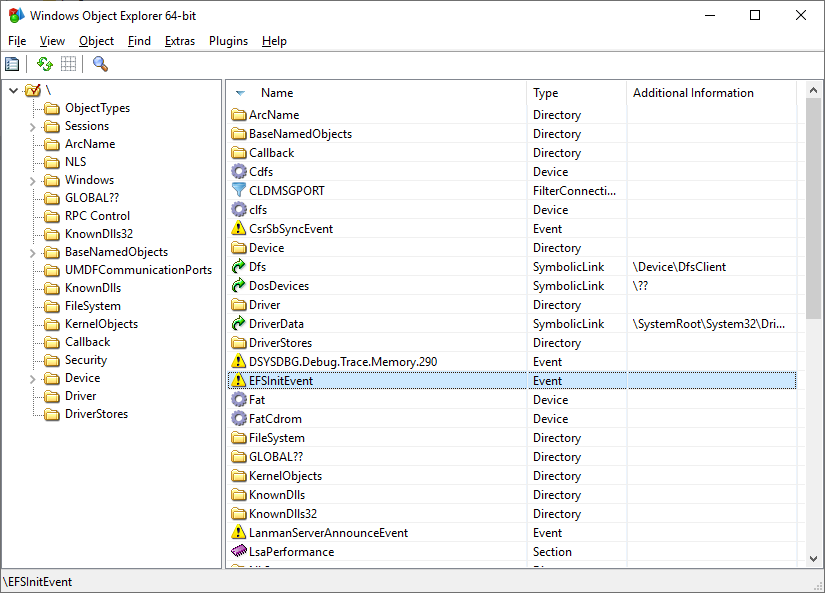
Pic 1. WinObjEx64 main window

This version mostly focusing on fixing various incompatibility issues and bugs found during usage/tests as well as providing additional support for newest Windows 10 20H1. 

Lets start with fixes.

The first important fix is for High DPI use case where several dialogs (presumable Object page, UserSharedData and ApiSetSchema main window) were affected with GUI artifacts during running with non default system DPI values. There personally I don't have enough usage data to fix this earlier as at least Object/UserSharedData dialogs were affected for a long time.

Another fix is for Pipe dialog, where Security page was mistakenly disabled even when security information was available for selected pipe. This regression was added in one of the previous releases.

Lots of work related to making WinObjEx64 run on Wine/Wine-Staging. The main problem with Wine was always how it interprets internals of Windows Native API. Without proper workarounds it is impossible to run WinObjEx64 on Wine. For example one of first problems with Wine in the past was how Wine defines NtQueryDirectoryObject behavior - in a completely different way than it is on Windows. It required input buffer not to be NULL and does not return required buffer size. Another big glitch was related to how it align several system information structures in memory with layout identical for both x86-32 and x64.

This time the following Wine/Wine-Staging incompatibles/bugs were fixed:
  1. Wine has no themes support from the box. Maybe they somehow can be enabled, IDK and honestly don't care, but from the box it doesn't have them. No support in Wine-Staging too. WinObjEx64 uses custom control named TreeList which is a combination of header and treeview controls. With no themes support there was no glyphs (opened/closed) used for parent node identification. So now they are drawn manually in case if theme support is not available.
  2. Wine-Staging includes special hack "hide Wine exports from applications" which does exactly what is called. This is done for applications that a deliberately attempt to detect Wine presence (and probably won't allow execution on it). Internally this is implemented as patch for LdrGetProcedureAddress of Wine ntdll.dll, they check requested routine name against small blacklist, implementation details can be found here https://github.com/Endle/wine-staging-mirror/blob/0129dc85392882c97f8b50955bbf3633e0b573f4/patches/ntdll-Hide_Wine_Exports/0001-ntdll-Add-support-for-hiding-wine-version-informatio.patch#L115 However during usage we came across situation when we need this setting enabled and WinObjEx64 must be running too. For work WinObjEx64 must know if it is running on Wine, otherwise it will fail properly initialize. So this resulted in implementing bypass of the following Wine-Staging hack.
  3. Another one Wine problem was Globals window (can be called from About -> Globals button) always having no window title. Without digging why this happens on Wine this dialog was simple completely redesigned for better look and more details in output.
There also few small fixes including some typo fix in Debug object description.

What's new.

New Windows 10 20H1 syscall filtering callback was added to the callbacks dialog list. Keep in mind this particular Windows feature maybe not yet completed and perhaps may change in 20H1 release. Anyway I plan to keep it as long as possible. More details what this new callback does can be read here https://github.com/0xcpu/WinAltSyscallHandler/blob/master/README.md

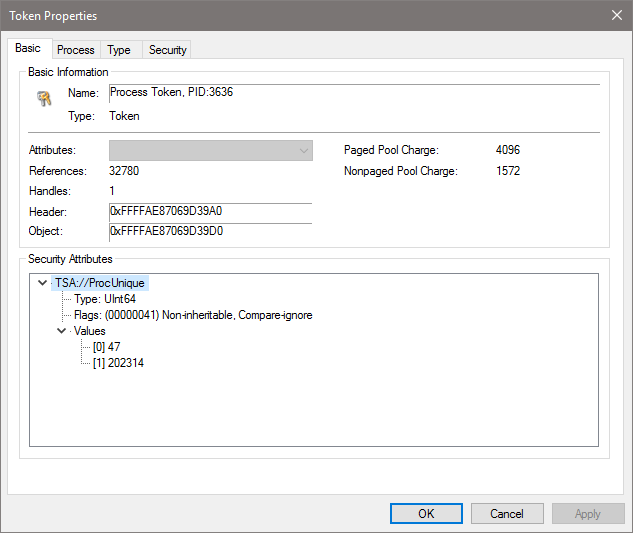
I've added viewing of token properties as object, including it security (which you can view and edit if you have enough privileges) and viewing of token security attributes (inspired by tiraniddo https://twitter.com/tiraniddo/status/1192583900645732352)


Pic 2. Token properties dialog.

That's all major changes in this version. The next one will be developed in 2020 and probably include bug fixes and compatibility fixes for Windows 10 20H1 as well as perhaps we can start adaptation for Windows 10 20H2.